> ## Documentation Index
> Fetch the complete documentation index at: https://momentic.ai/docs/llms.txt
> Use this file to discover all available pages before exploring further.
# Results and reporting
> View test results in the dashboard, generate JUnit, Allure, or Playwright JSON reports, and surface failures in CI.
Momentic produces results in two places:
1. **The dashboard** at [app.momentic.ai](https://app.momentic.ai): uploaded run
data with videos, traces, auto-heal history, and quarantine state.
2. **Local reports**: JUnit XML, Allure, Playwright JSON, or Buildkite JSON, for
feeding into other CI tooling.
## Uploading to the dashboard
Pass the upload flag on any `run` invocation:
```bash Web theme={null}
npx momentic run --upload-results
```
```bash Mobile theme={null}
npx momentic-mobile run --upload-results
```
Uploaded runs appear in the **Runs** view in the dashboard. `MOMENTIC_API_KEY`
must be set.
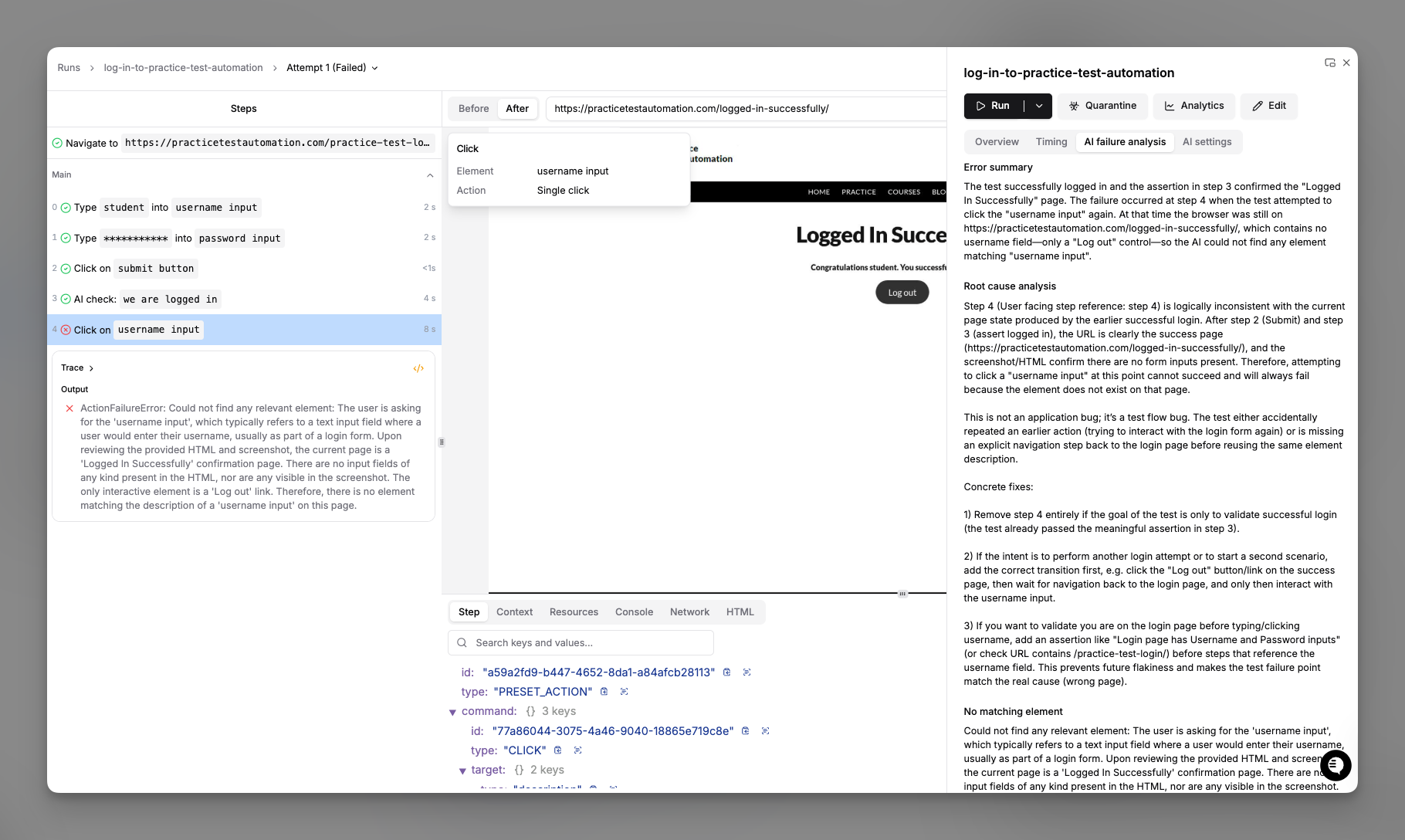 Every uploaded run surfaces with:
* **Status**: pass, fail, flaky, quarantined, cancelled
* **Duration** and **cost**, time the run took plus AI token usage
* **Environment** and **branch**, which env and Git branch the run targeted
* **Trigger**: CLI, API, scheduled, or manual
### Filtering
Filter runs by test name or label, environment or branch, status, time range, or
trigger type. Saved filters live in the left sidebar.
### Drilling into a run
Each run page shows every step with its status, duration, and artifacts. Click a
step to view its video replay, trace (DOM, network, console), screenshots,
[auto-heal](/reliability/auto-heal) traces when healing fired, and AI reasoning.
For web steps that used element location, the detail pane also includes a
**Cache** section showing whether the step used cache, missed cache, busted
cache before use, or had no cache, along with the reason when available.
The result tree keeps noisy step structures compact:
* Conditional rows read as `If ...` and show the evaluated outcome inline as
`= true` or `= false`.
* Retried steps collapse to one final row with a retry count; expand it to see
each `Attempt N`.
* While loops expand into `Iteration N` groups so each pass through the body is
inspectable.
You can also inspect the same run UI locally against a folder of run results
using [`momentic results view`](/cli-reference/momentic/commands/results#view)
(or
[`momentic-mobile results view`](/cli-reference/momentic-mobile/commands/results#view)
for mobile).
### Sharing
Each run has a shareable URL. Team members with workspace access can open it
directly.
## Generating local reports
Pass `--reporter` to `run` to emit a standardized report file into the
[`reporterDir`](/configuration/momentic-config#reporterdir) (defaults to
`./reports`):
```bash Web theme={null}
npx momentic run --reporter junit
```
```bash Mobile theme={null}
npx momentic-mobile run --reporter junit
```
Supported formats:
| Format | Web | Mobile | Notes |
| ----------------- | --- | ------ | ------------------------------------------------------------------------------------------- |
| `json` | Yes | Yes | Momentic JSON report with structured run results and classifications. |
| `junit` | Yes | Yes | JUnit XML. Drops into any CI system that surfaces JUnit. |
| `allure` | Yes | Yes | [Allure](https://allurereport.org/) result directory. |
| `allure-json` | Yes | Yes | Allure JSON results (one file per test). |
| `playwright-json` | Yes | No | Playwright-style JSON report. |
| `buildkite-json` | Yes | Yes | [Buildkite Test Analytics](https://buildkite.com/docs/test-analytics) JSON format. |
| `newrelic` | Yes | No | Pushes custom events to [New Relic](/guides/reporting/new-relic) instead of writing a file. |
See [`momentic run`](/cli-reference/momentic/commands/run#reporter-reporter) and
[`momentic-mobile run`](/cli-reference/momentic-mobile/commands/run#reporter-reporter)
for the full CLI flag reference.
## Live run progress
While a run is in flight, the CLI writes a `progress.json` file to the top of
the [`--output-dir`](/cli-reference/momentic/commands/run#output) (defaults to
`./test-results`). It is updated as steps complete, so you can poll it to track
long runs (for example, to report that a test has finished "53 of 70 steps") or
forward it to your own reporting pipeline.
The file holds an aggregate roll-up plus one entry per test run:
```json theme={null}
{
"schemaVersion": "1.0.0",
"runGroupId": "01J...",
"status": "RUNNING",
"totalRuns": 2,
"completedRuns": 1,
"completedSteps": 58,
"totalSteps": 124,
"startedAt": "2026-06-13T03:11:00.000Z",
"updatedAt": "2026-06-13T03:12:04.000Z",
"runs": [
{
"runId": "01J...",
"testId": "abc123",
"testName": "checkout/happy-path",
"directory": "checkout",
"status": "PASSED",
"completedSteps": 70,
"totalSteps": 70,
"startedAt": "2026-06-13T03:11:00.000Z",
"updatedAt": "2026-06-13T03:11:48.000Z"
},
{
"runId": "01J...",
"testName": "checkout/coupon",
"status": "RUNNING",
"completedSteps": 53,
"totalSteps": 70,
"startedAt": "2026-06-13T03:11:48.000Z",
"updatedAt": "2026-06-13T03:12:04.000Z"
}
]
}
```
Notes on the counts:
* `completedSteps` / `totalSteps` count top-level steps. An AI action and its
substeps count as one step; a module or section counts as one plus its nested
steps; a conditional counts as one assertion plus its largest branch (only one
branch runs); a while loop counts as one step regardless of iterations.
* The file is written atomically and updated on a short throttle, so a reader
always sees a complete, valid JSON document.
* When tests are sharded across multiple machines, each shard has its own
`--output-dir` and therefore its own `progress.json`. When tests run across
parallel workers on a single machine, the parent process writes one merged
`progress.json` covering all workers.
## CI integration
Every [CI/CD template](/running-tests/ci/github-actions) uploads results by
default. See your CI provider's page for the ready-to-paste config.
## Artifacts
Failed runs include:
* **Video**: enable via
[`recordVideo`](/configuration/momentic-config#recordvideo) in
`momentic.config.yaml`
* **Trace**: always captured on failure
* **Screenshots**: captured at each step
* **Auto-heal traces**: shown in the run viewer when
[auto-heal](/reliability/auto-heal) fires
All artifacts are visible in the dashboard; local artifacts live under
[`reporterDir`](/configuration/momentic-config#reporterdir).
## Viewing runs outside the dashboard
The result viewer behind `momentic results view` also ships as a static bundle
you can host yourself, useful when you'd rather serve run results from your own
infrastructure. See
[Self-host the result viewer](/guides/reporting/self-hosted-result-viewer).
Every uploaded run surfaces with:
* **Status**: pass, fail, flaky, quarantined, cancelled
* **Duration** and **cost**, time the run took plus AI token usage
* **Environment** and **branch**, which env and Git branch the run targeted
* **Trigger**: CLI, API, scheduled, or manual
### Filtering
Filter runs by test name or label, environment or branch, status, time range, or
trigger type. Saved filters live in the left sidebar.
### Drilling into a run
Each run page shows every step with its status, duration, and artifacts. Click a
step to view its video replay, trace (DOM, network, console), screenshots,
[auto-heal](/reliability/auto-heal) traces when healing fired, and AI reasoning.
For web steps that used element location, the detail pane also includes a
**Cache** section showing whether the step used cache, missed cache, busted
cache before use, or had no cache, along with the reason when available.
The result tree keeps noisy step structures compact:
* Conditional rows read as `If ...` and show the evaluated outcome inline as
`= true` or `= false`.
* Retried steps collapse to one final row with a retry count; expand it to see
each `Attempt N`.
* While loops expand into `Iteration N` groups so each pass through the body is
inspectable.
You can also inspect the same run UI locally against a folder of run results
using [`momentic results view`](/cli-reference/momentic/commands/results#view)
(or
[`momentic-mobile results view`](/cli-reference/momentic-mobile/commands/results#view)
for mobile).
### Sharing
Each run has a shareable URL. Team members with workspace access can open it
directly.
## Generating local reports
Pass `--reporter` to `run` to emit a standardized report file into the
[`reporterDir`](/configuration/momentic-config#reporterdir) (defaults to
`./reports`):
```bash Web theme={null}
npx momentic run --reporter junit
```
```bash Mobile theme={null}
npx momentic-mobile run --reporter junit
```
Supported formats:
| Format | Web | Mobile | Notes |
| ----------------- | --- | ------ | ------------------------------------------------------------------------------------------- |
| `json` | Yes | Yes | Momentic JSON report with structured run results and classifications. |
| `junit` | Yes | Yes | JUnit XML. Drops into any CI system that surfaces JUnit. |
| `allure` | Yes | Yes | [Allure](https://allurereport.org/) result directory. |
| `allure-json` | Yes | Yes | Allure JSON results (one file per test). |
| `playwright-json` | Yes | No | Playwright-style JSON report. |
| `buildkite-json` | Yes | Yes | [Buildkite Test Analytics](https://buildkite.com/docs/test-analytics) JSON format. |
| `newrelic` | Yes | No | Pushes custom events to [New Relic](/guides/reporting/new-relic) instead of writing a file. |
See [`momentic run`](/cli-reference/momentic/commands/run#reporter-reporter) and
[`momentic-mobile run`](/cli-reference/momentic-mobile/commands/run#reporter-reporter)
for the full CLI flag reference.
## Live run progress
While a run is in flight, the CLI writes a `progress.json` file to the top of
the [`--output-dir`](/cli-reference/momentic/commands/run#output) (defaults to
`./test-results`). It is updated as steps complete, so you can poll it to track
long runs (for example, to report that a test has finished "53 of 70 steps") or
forward it to your own reporting pipeline.
The file holds an aggregate roll-up plus one entry per test run:
```json theme={null}
{
"schemaVersion": "1.0.0",
"runGroupId": "01J...",
"status": "RUNNING",
"totalRuns": 2,
"completedRuns": 1,
"completedSteps": 58,
"totalSteps": 124,
"startedAt": "2026-06-13T03:11:00.000Z",
"updatedAt": "2026-06-13T03:12:04.000Z",
"runs": [
{
"runId": "01J...",
"testId": "abc123",
"testName": "checkout/happy-path",
"directory": "checkout",
"status": "PASSED",
"completedSteps": 70,
"totalSteps": 70,
"startedAt": "2026-06-13T03:11:00.000Z",
"updatedAt": "2026-06-13T03:11:48.000Z"
},
{
"runId": "01J...",
"testName": "checkout/coupon",
"status": "RUNNING",
"completedSteps": 53,
"totalSteps": 70,
"startedAt": "2026-06-13T03:11:48.000Z",
"updatedAt": "2026-06-13T03:12:04.000Z"
}
]
}
```
Notes on the counts:
* `completedSteps` / `totalSteps` count top-level steps. An AI action and its
substeps count as one step; a module or section counts as one plus its nested
steps; a conditional counts as one assertion plus its largest branch (only one
branch runs); a while loop counts as one step regardless of iterations.
* The file is written atomically and updated on a short throttle, so a reader
always sees a complete, valid JSON document.
* When tests are sharded across multiple machines, each shard has its own
`--output-dir` and therefore its own `progress.json`. When tests run across
parallel workers on a single machine, the parent process writes one merged
`progress.json` covering all workers.
## CI integration
Every [CI/CD template](/running-tests/ci/github-actions) uploads results by
default. See your CI provider's page for the ready-to-paste config.
## Artifacts
Failed runs include:
* **Video**: enable via
[`recordVideo`](/configuration/momentic-config#recordvideo) in
`momentic.config.yaml`
* **Trace**: always captured on failure
* **Screenshots**: captured at each step
* **Auto-heal traces**: shown in the run viewer when
[auto-heal](/reliability/auto-heal) fires
All artifacts are visible in the dashboard; local artifacts live under
[`reporterDir`](/configuration/momentic-config#reporterdir).
## Viewing runs outside the dashboard
The result viewer behind `momentic results view` also ships as a static bundle
you can host yourself, useful when you'd rather serve run results from your own
infrastructure. See
[Self-host the result viewer](/guides/reporting/self-hosted-result-viewer).