> ## Documentation Index
> Fetch the complete documentation index at: https://momentic.ai/docs/llms.txt
> Use this file to discover all available pages before exploring further.
# CircleCI
> Run Momentic tests from CircleCI, with sharding and secrets.
Example config for running Momentic on [CircleCI](https://circleci.com/). More
reference configs live in
[momentic-ai/examples](https://github.com/momentic-ai/examples).
For a given root `package.json`:
```json package.json theme={null}
{
"name": "my-momentic-repo",
"scripts": {},
"devDependencies": {
"momentic": "latest"
}
}
```
Create a file called `.circleci/config.yml` in your repository with the
following contents:
```yaml config.yml theme={null}
version: 2.1
orbs:
node: circleci/node@5.0.2
workflows:
test:
jobs:
- test
jobs:
test:
docker:
- image: cimg/node:lts
steps:
- checkout
- node/install-packages
- run:
name: Install browsers
command: npx momentic install-browsers --all
- run:
name: Run Momentic tests
command: npx momentic run
when: always
- run:
name: Upload results
command: npx momentic results upload test-results
when: always
```
## Authentication
To run any commands, you must authenticate with Momentic. You can do this by
setting the `MOMENTIC_API_KEY` environment variable in your CircleCI project
settings.
1. Create an API key in
[Momentic dashboard](https://app.momentic.ai/settings/api-keys).
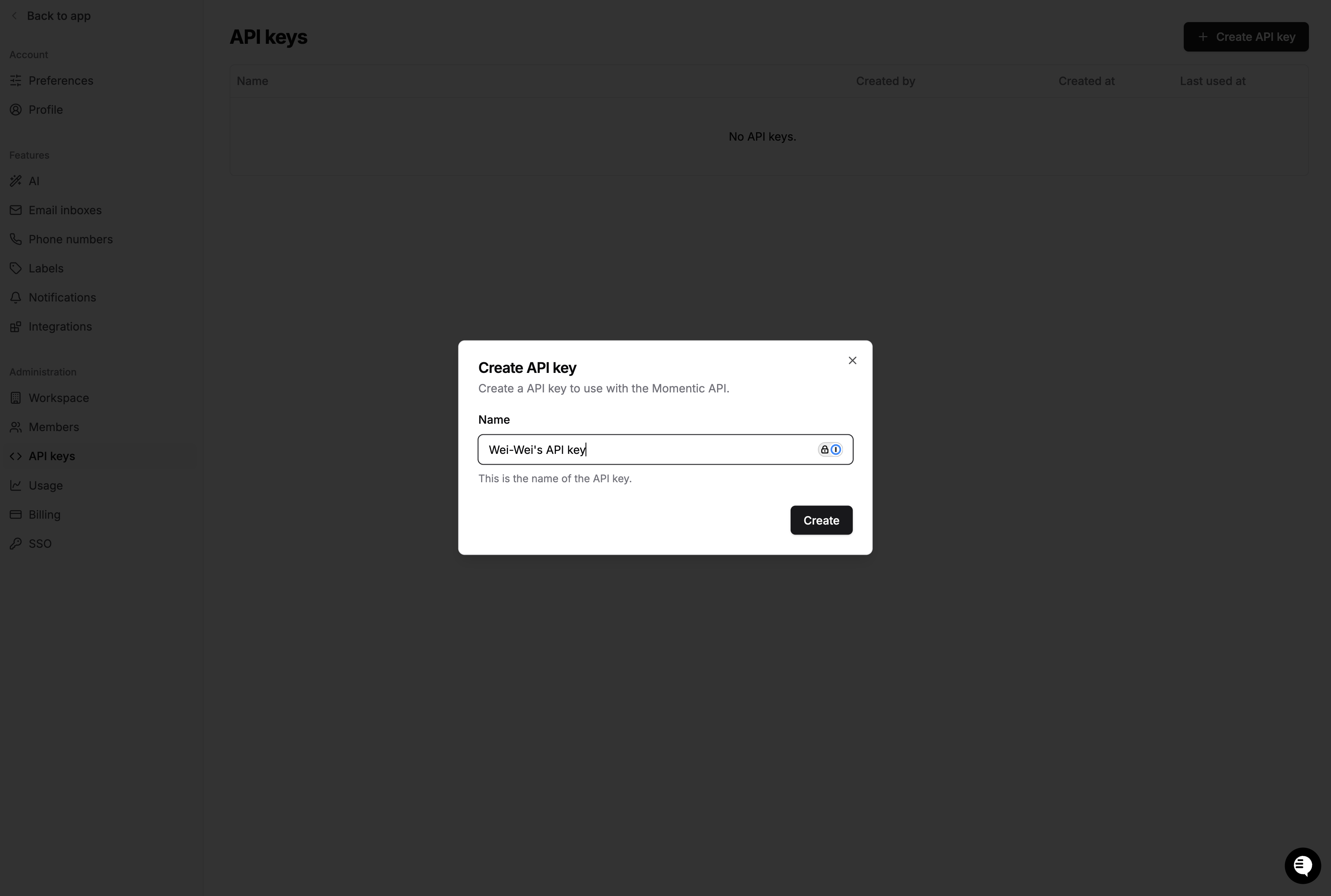 Copy the value to a safe place. You'll need it in a moment.
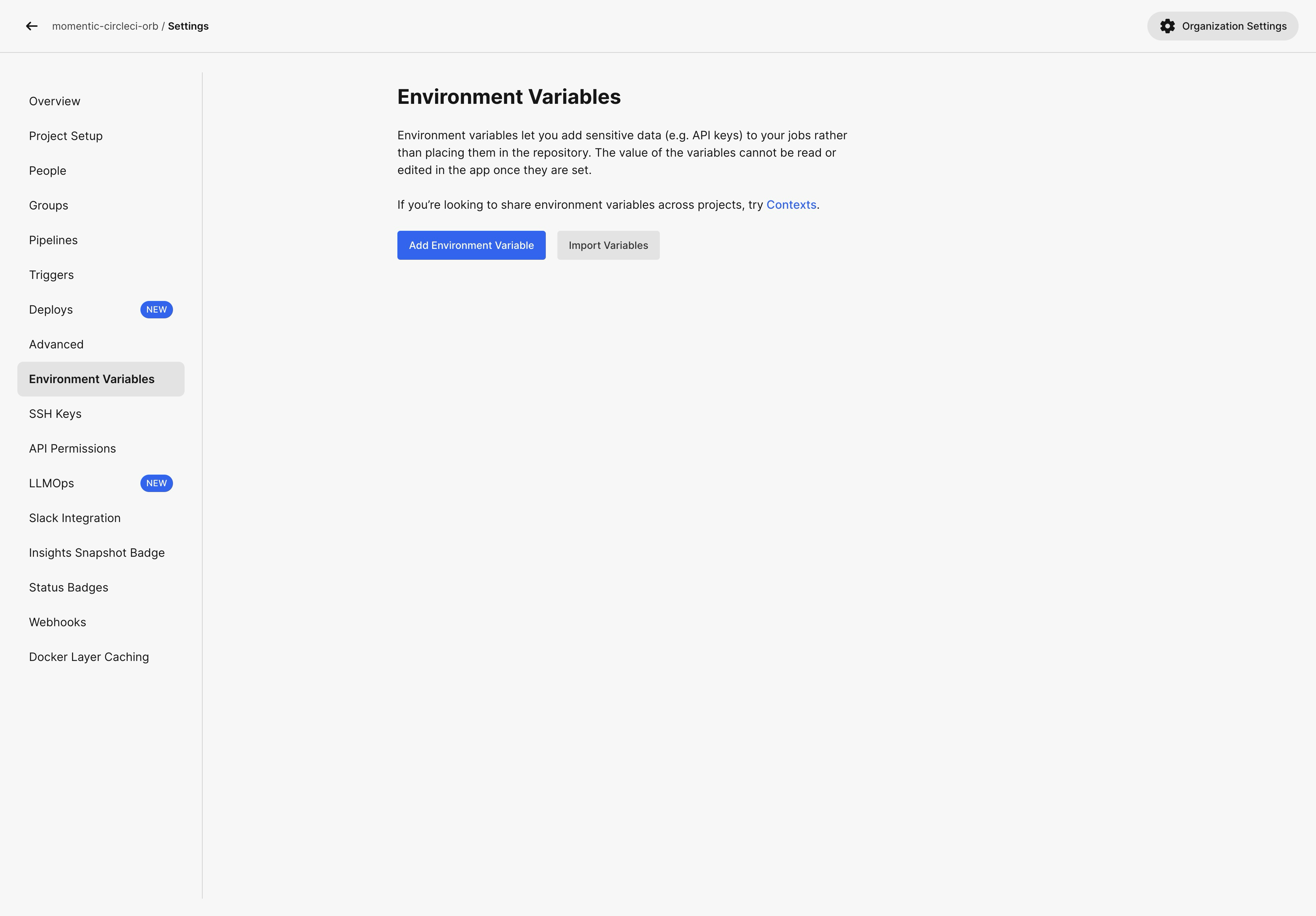
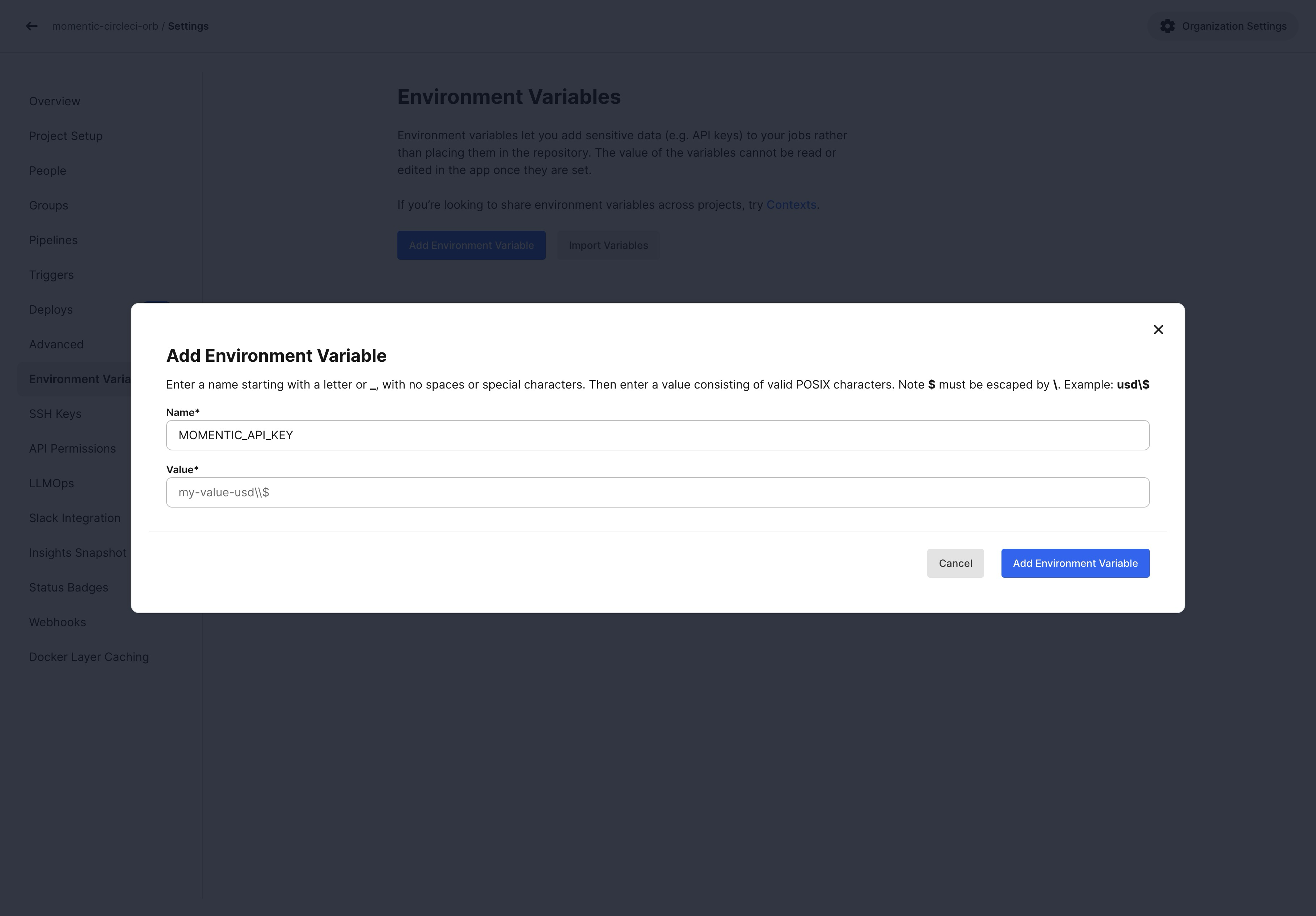
2. Go to your CircleCI project settings and click on the **Environment
Variables** tab. Create a new secret called `MOMENTIC_API_KEY` and enter the
value of your API key.
Copy the value to a safe place. You'll need it in a moment.
2. Go to your CircleCI project settings and click on the **Environment
Variables** tab. Create a new secret called `MOMENTIC_API_KEY` and enter the
value of your API key.
 3. CircleCI automatically loads environment variables stored in project settings
into the CI environment. No modifications are necessary for the CI file.
## Sharding
If you have a large test set, you can use sharding to run tests in parallel.
This can significantly speed up your CI runs.
To shard your tests, pass the `--shard-index` and `--shard-count` options to the
`momentic run` command. The `shard-index` is the index of the current shard
(starting from 1), and `shard-count` is the total number of shards.
To collect test results inside a single run group in Momentic dashboard, you
need to add a separate step after all tests complete to merge and upload
results.
```yaml config.yml theme={null}
version: 2.1
orbs:
node: circleci/node@5.0.2
jobs:
run-tests:
parallelism: 2
executor: node/default
steps:
- checkout
- node/install-packages
- run:
name: Install browsers
command: npx momentic install-browsers --all
- run:
name: Run tests
command: |
npx momentic run \
--output-dir test-results/shard-${CIRCLE_NODE_INDEX} \
--shard-index $(($CIRCLE_NODE_INDEX+1)) \
--shard-count ${CIRCLE_NODE_TOTAL}
- store_artifacts:
when: always
path: ./test-results
- persist_to_workspace:
when: always
root: .
paths:
- test-results
upload-results:
executor: node/default
steps:
- checkout
- node/install-packages
- attach_workspace:
at: .
- run:
name: Merge test results
command: npx momentic results merge --output-dir test-results/merged test-results
- run:
name: Upload test results
command: npx momentic results upload test-results/merged
workflows:
test:
jobs:
- run-tests
- upload-results:
requires:
- run-tests:
- success
- failed
```
3. CircleCI automatically loads environment variables stored in project settings
into the CI environment. No modifications are necessary for the CI file.
## Sharding
If you have a large test set, you can use sharding to run tests in parallel.
This can significantly speed up your CI runs.
To shard your tests, pass the `--shard-index` and `--shard-count` options to the
`momentic run` command. The `shard-index` is the index of the current shard
(starting from 1), and `shard-count` is the total number of shards.
To collect test results inside a single run group in Momentic dashboard, you
need to add a separate step after all tests complete to merge and upload
results.
```yaml config.yml theme={null}
version: 2.1
orbs:
node: circleci/node@5.0.2
jobs:
run-tests:
parallelism: 2
executor: node/default
steps:
- checkout
- node/install-packages
- run:
name: Install browsers
command: npx momentic install-browsers --all
- run:
name: Run tests
command: |
npx momentic run \
--output-dir test-results/shard-${CIRCLE_NODE_INDEX} \
--shard-index $(($CIRCLE_NODE_INDEX+1)) \
--shard-count ${CIRCLE_NODE_TOTAL}
- store_artifacts:
when: always
path: ./test-results
- persist_to_workspace:
when: always
root: .
paths:
- test-results
upload-results:
executor: node/default
steps:
- checkout
- node/install-packages
- attach_workspace:
at: .
- run:
name: Merge test results
command: npx momentic results merge --output-dir test-results/merged test-results
- run:
name: Upload test results
command: npx momentic results upload test-results/merged
workflows:
test:
jobs:
- run-tests
- upload-results:
requires:
- run-tests:
- success
- failed
```