> ## Documentation Index
> Fetch the complete documentation index at: https://momentic.ai/docs/llms.txt
> Use this file to discover all available pages before exploring further.
# Results classification
> AI-generated classification and triage actions for failed CLI runs, surfaced in the dashboard and CLI.
When a CLI run fails, Momentic can classify the result, explain the reasoning,
and attach an action that downstream workflows use for triage. Classification
turns raw failure output into a category such as application change, test
authorship, test setup, infrastructure, Momentic issue, bug, or other.
## Capabilities
Results classification can use run artifacts such as screenshots, page state,
URLs, step descriptions, element-targeting details, error messages, and stack
traces, plus evidence from past runs. It is designed to:
* Distinguish product changes from brittle or outdated test authoring.
* Separate application bugs from infrastructure, gateway, browser, or external
service failures.
* Identify missing setup such as test data, files, credentials, or shared
fixture state.
* Detect timing races, missing waits, and async producer/consumer mismatches.
* Notice when an earlier passing step looks like a false positive based on the
later evidence.
* Flag cases where Momentic execution, AI, cache, or recovery behavior appears
to be the failure source.
* Estimate whether the failure is recoverable by an automated follow-up.
## Git context
When classification runs in an environment with a git checkout (for example,
`momentic ai classify` in CI or locally), it can read the commit log, per-file
diffs, and file contents for the change under test to judge whether a recent
code change caused the failure. On a feature branch, the agent sees the commits
and diff against the main branch, plus the open pull request's title and
description when a GitHub App installation is connected; on the main branch, it
sees the most recent commits.
If no usable local git history exists (for example, a shallow clone or a
checkout that does not match the branch the run was recorded on), Momentic falls
back to reading the same information remotely through your GitHub App
installation. If neither is available, classification proceeds without git
context.
## Service logs
Classification can also search diagnostic files that your CI pipeline stores
under the test output directory (`./test-results` by default, or the directory
passed with `--output-dir`). Any file there that is not a standard Momentic
artifact (backend logs, worker logs, database output) is surfaced to the
classification agent, which can grep through it to attribute a failure to a
specific service error.
Logs must already exist in the output directory when classification runs.
Because classification can run while tests are still executing, stream service
logs there from the moment your services start rather than copying them in
afterwards. For example, in a GitHub Actions workflow:
```yaml theme={null}
- name: Start backend with logs streamed into the output directory
run: |
mkdir -p ./test-results/service-logs
docker logs --follow my-backend > ./test-results/service-logs/backend.log 2>&1 &
- name: Run Momentic tests
run: npx momentic run --output-dir ./test-results
```
## Actions
Each category has a configured action:
* **Heal** writes the classification data needed for the healing agent to pick
up the run and attempt a repair. It exits zero when waiting from the CLI.
* **Warn** notifies the user through configured notification channels and exits
zero when waiting from the CLI.
* **Fail** keeps the run blocking and exits with code 1.
You can tune the action for each category in
[Settings > Classification](https://app.momentic.ai/settings/classification).
## Where you see it
The run viewer surfaces results classification in the failure details for a run:
* Category and reasoning
* Confidence and recoverability when available
* Selected post-classification action
* Error summary and supporting details
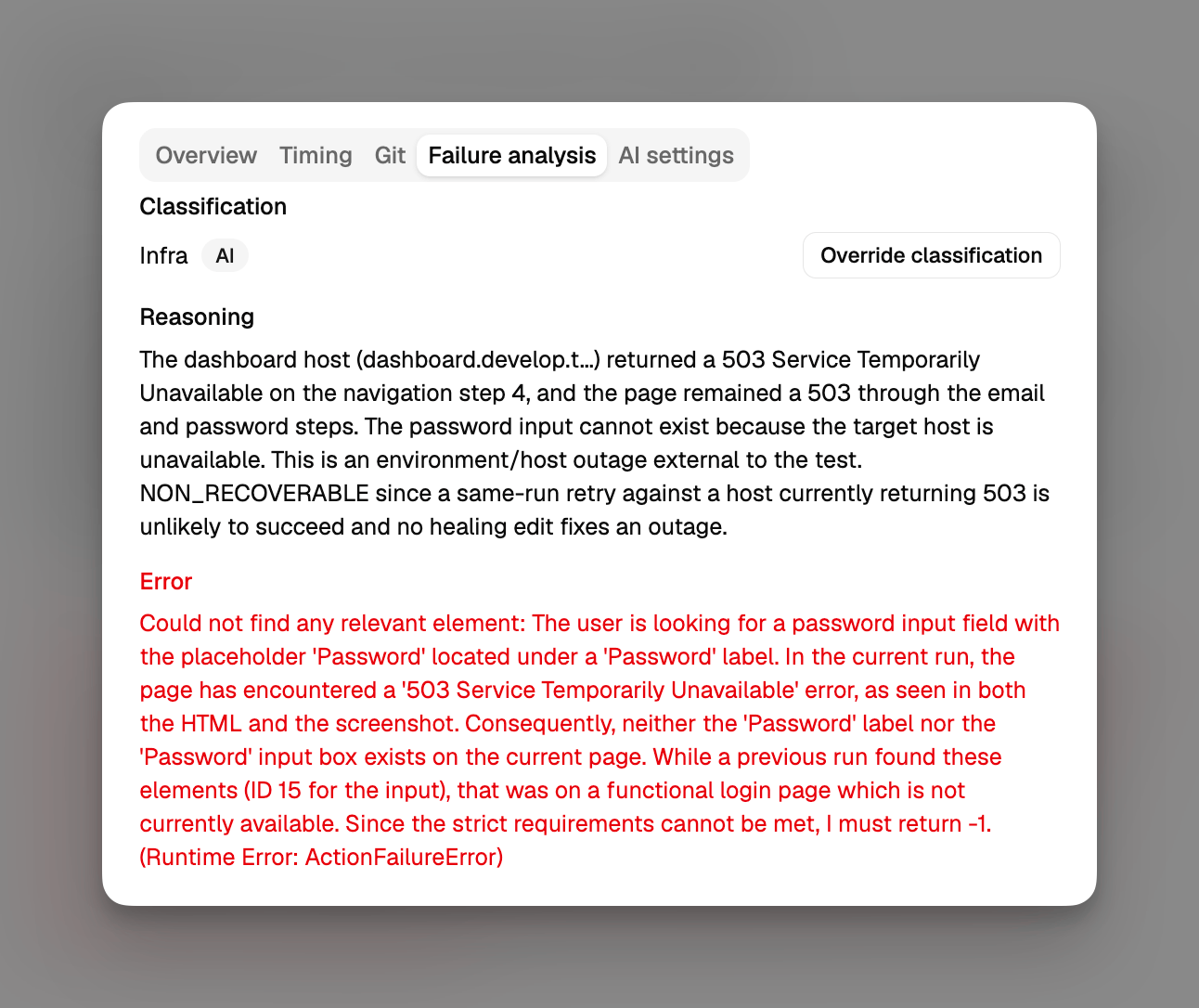 The CLI also prints classification details when it waits for run completion, so
CI output can distinguish blocking failures from runs that were routed to warn
or healing behavior.
## Manual classification override
The AI classification is a starting point. From the run viewer, you can override
the category and add a reason when the AI miscategorizes a failure or when you
want to attribute a run to a category your team tracks.
Manual overrides are visually distinct from AI classifications in the run
viewer, and the run keeps both: the AI's original category is archived as the
previous classification when you save your override. The override flows through
the same write path as the AI classifier, so it shows up in dashboard filters
and metrics.
## Configuration
Classification's on/off toggle and exit-code override were previously
controlled by the cloud dashboard's **Classify on fail** and **Override CI
exit code** settings. Those cloud toggles are deprecated and will be removed
in a future release - set `enabled` and `overrideExitCode` in
`momentic.config.yaml` (below) instead. Failure categories and their actions
stay cloud-managed.
Turn classification on or off in `momentic.config.yaml`:
```yaml momentic.config.yaml theme={null}
ai:
classification: true
```
Use the object form for finer control:
```yaml momentic.config.yaml theme={null}
ai:
classification:
enabled: true
overrideExitCode: true
```
* `enabled` runs the classifier on failed runs.
* `overrideExitCode` (default `false`) lets the verdict decide the exit code.
Override is opt-in: by default the classifier keeps recording categories while
every failed test still fails CI. Set it to `true` so failures routed to
**heal** or **warn** exit `0`. Opt in per run with
[`--classify-override-exit-code`](/cli-reference/momentic/commands/run).
See [AI configuration](/configuration/ai#ai-classification) for the full
reference.
The failure categories and their actions stay cloud-managed in
[Settings > Classification](https://app.momentic.ai/settings/classification).
The CLI also prints classification details when it waits for run completion, so
CI output can distinguish blocking failures from runs that were routed to warn
or healing behavior.
## Manual classification override
The AI classification is a starting point. From the run viewer, you can override
the category and add a reason when the AI miscategorizes a failure or when you
want to attribute a run to a category your team tracks.
Manual overrides are visually distinct from AI classifications in the run
viewer, and the run keeps both: the AI's original category is archived as the
previous classification when you save your override. The override flows through
the same write path as the AI classifier, so it shows up in dashboard filters
and metrics.
## Configuration
Classification's on/off toggle and exit-code override were previously
controlled by the cloud dashboard's **Classify on fail** and **Override CI
exit code** settings. Those cloud toggles are deprecated and will be removed
in a future release - set `enabled` and `overrideExitCode` in
`momentic.config.yaml` (below) instead. Failure categories and their actions
stay cloud-managed.
Turn classification on or off in `momentic.config.yaml`:
```yaml momentic.config.yaml theme={null}
ai:
classification: true
```
Use the object form for finer control:
```yaml momentic.config.yaml theme={null}
ai:
classification:
enabled: true
overrideExitCode: true
```
* `enabled` runs the classifier on failed runs.
* `overrideExitCode` (default `false`) lets the verdict decide the exit code.
Override is opt-in: by default the classifier keeps recording categories while
every failed test still fails CI. Set it to `true` so failures routed to
**heal** or **warn** exit `0`. Opt in per run with
[`--classify-override-exit-code`](/cli-reference/momentic/commands/run).
See [AI configuration](/configuration/ai#ai-classification) for the full
reference.
The failure categories and their actions stay cloud-managed in
[Settings > Classification](https://app.momentic.ai/settings/classification).