> ## Documentation Index
> Fetch the complete documentation index at: https://momentic.ai/docs/llms.txt
> Use this file to discover all available pages before exploring further.
# AI test maintenance
> Use AI to escalate from in-run locator fixes to transient recovery, permanent healing, and quarantine.
Momentic starts with the least invasive response and escalates only when needed.
Re-resolve a stale target or wait for the page to settle. The current step
continues without editing the test.
Failure recovery generates temporary steps to clear an obstruction, then
retries the failed step. The test still does not change.
Classification and triage explain the failure, decide whether it is
healable, and permanently repair the test when possible.
Keep an unresolved flaky test running and collecting data without letting it
block CI.
Not every failure reaches every layer. Real product regressions and
infrastructure failures remain failures; quarantine is containment, not a
repair.
## Locator auto-healing
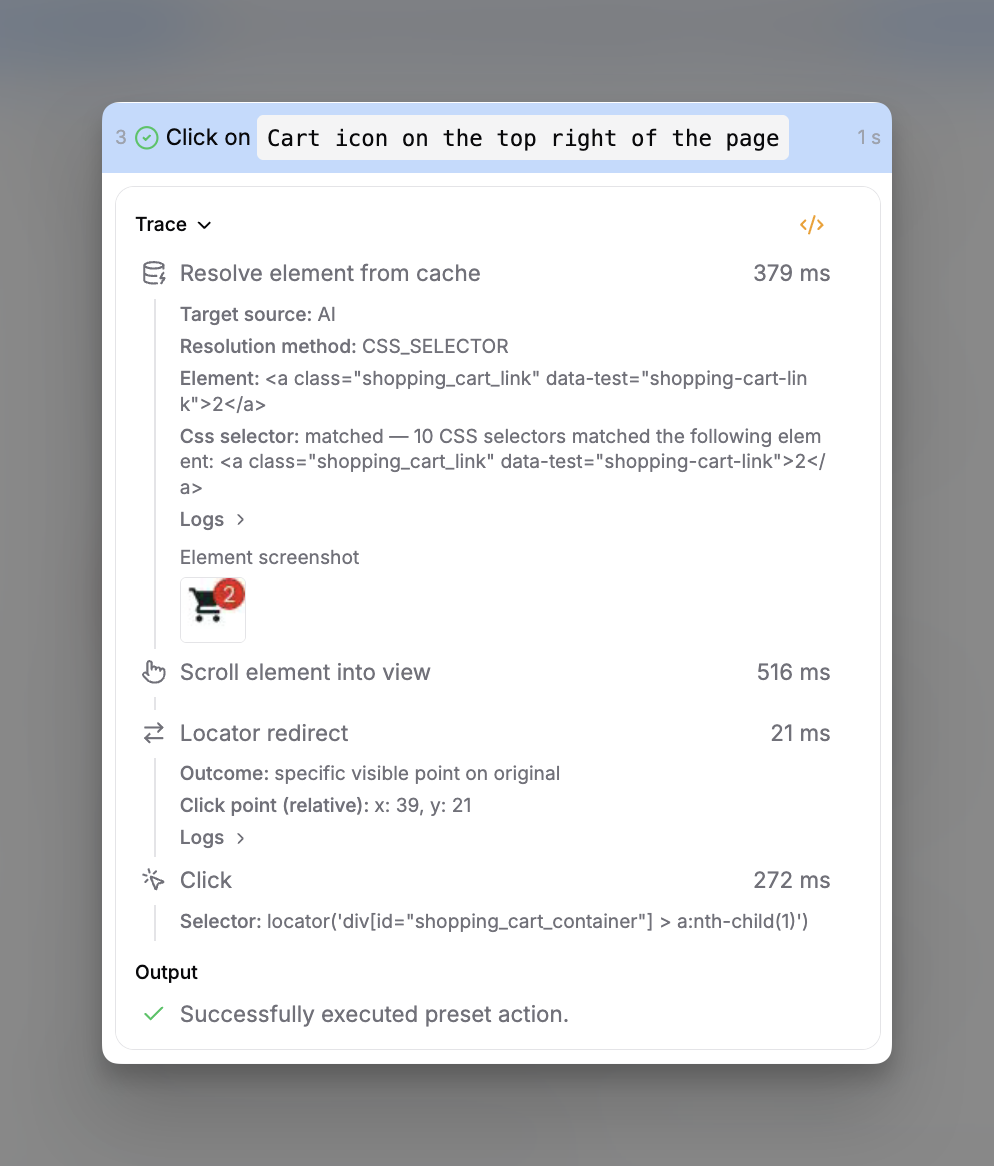
When a cached target no longer matches the page, the locator agent finds the
element again from the step's description. Smart waiting also waits for
navigation, requests, and page changes to settle before the action runs.
The resolution applies to the current run and never edits the test. After an
eligible successful run, Momentic can save it to the
[step cache](/docs/reliability/step-cache) for fast replay.
 If the target is correct but a temporary condition still blocks the flow, the
next layer is [transient recovery](#transient-recovery).
## Transient recovery
Failure recovery is in beta and may change.
During eligible CI runs, **failure recovery** can generate temporary steps to
clear a cookie banner, wait out a transition, or handle another transient
obstruction. It then retries the failed preset step. Generated steps apply only
to that run and never edit the test.
Enable it in `momentic.config.yaml`:
```yaml momentic.config.yaml theme={null}
ai:
failureRecovery: true
```
When [in-flow classification](/docs/guides/auto-heal/in-flow-classification) is
enabled, the classifier investigates the failure first. Only failures mapped to
**heal** and judged recoverable trigger a recovery attempt. Without
classification, a built-in recovery planner makes that decision.
Recovery does not run in the editor and stops after three recoveries in one run.
Only failed preset steps are eligible, including preset steps inside modules;
module containers and **AI action** steps are not. It does not hide product
regressions, configuration errors, network outages, 5xx responses, CAPTCHAs, or
browser crashes. See [AI configuration](/docs/configuration/ai#ai-failurerecovery)
for the full reference.
Frequent recovery is a flakiness signal. Use
[permanent healing](#permanent-healing) to find and fix the cause.
## Permanent healing
Classification and triage form one post-run maintenance loop:
1. **Classify** examines run artifacts, repository changes, prior runs, and any
service logs in the results directory. It assigns a category, reasoning, and
the configured **heal**, **warn**, or **fail** action.
2. **Triage**, when it runs, groups related failures, investigates those routed
to healing, edits the affected tests, and verifies each proposed repair.
3. **Deliver** opens a pull request or draft, commits the repair, prints a
patch, or leaves the changes on disk according to your
[Triage settings](https://app.momentic.ai/settings/triage).
Run tests into a results directory, then triage failures from that directory:
```bash theme={null}
npx momentic run --output-dir test-results
npx momentic ai triage test-results --yes --timeout-minutes 10
```
Classification behavior is configured in
[`ai.classification`](/docs/configuration/ai#ai-classification). Category actions and
project-specific classification guidance live in
[Classification settings](https://app.momentic.ai/settings/classification). You
can override an incorrect category from the run viewer.
To keep CI passing while a heal is pending, in-flow classification can return a
successful exit code for failures routed to **heal** or **warn** while failures
routed to **fail** still block the build. See
[Let the verdict gate CI](/docs/guides/auto-heal/in-flow-classification#let-the-verdict-gate-ci).
For CI, make sure triage runs even when the test step fails:
```yaml .github/workflows/momentic.yml theme={null}
- name: Run tests
continue-on-error: true
run: npx momentic run --output-dir test-results
- name: Triage failing tests
if: always()
run: npx momentic ai triage test-results --yes --timeout-minutes 10
```
The complete
[auto-maintenance workflow](https://github.com/momentic-ai/examples/blob/main/.github/workflows/test-ai-heal-demo.yml)
includes authentication, permissions, checkout, and browser setup. See the
[GitHub Actions guide](/docs/running-tests/ci/github-actions) or another
[CI integration](/docs/running-tests/ci/custom-setups) for runner setup. The
[`momentic ai` reference](/docs/cli-reference/momentic/commands/ai#triage) covers
alternative run selectors, queue filters, parallelism, delivery overrides, and
exit codes.
If a recurring flake cannot yet be repaired, contain it with
[quarantine](#quarantine).
## Quarantine
Quarantine keeps a flaky test running without letting its failures fail the
build. The run remains visible in the dashboard as a quarantined failure, so you
keep the evidence needed to fix it.
```bash theme={null}
npx momentic quarantine add --reason
```
You can also quarantine from the run viewer or the dashboard's **Quarantine**
page. Quarantine rules can act automatically based on pass rate, failure count,
flake rate, or [transient recovery](#transient-recovery) usage. See the
[`momentic quarantine` reference](/docs/cli-reference/momentic/commands/quarantine)
for commands and rule options.
Quarantine should be temporary. Continue with
[debugging flaky tests](/docs/best-practices/debugging-flaky-tests), then remove the
quarantine when the test is stable.
## Related
* [How Momentic works](/docs/get-started/how-momentic-works)
* [What is AI-native testing?](/docs/get-started/ai-native-testing#maintain-automatically)
* [Results and reporting](/docs/running-tests/results)
If the target is correct but a temporary condition still blocks the flow, the
next layer is [transient recovery](#transient-recovery).
## Transient recovery
Failure recovery is in beta and may change.
During eligible CI runs, **failure recovery** can generate temporary steps to
clear a cookie banner, wait out a transition, or handle another transient
obstruction. It then retries the failed preset step. Generated steps apply only
to that run and never edit the test.
Enable it in `momentic.config.yaml`:
```yaml momentic.config.yaml theme={null}
ai:
failureRecovery: true
```
When [in-flow classification](/docs/guides/auto-heal/in-flow-classification) is
enabled, the classifier investigates the failure first. Only failures mapped to
**heal** and judged recoverable trigger a recovery attempt. Without
classification, a built-in recovery planner makes that decision.
Recovery does not run in the editor and stops after three recoveries in one run.
Only failed preset steps are eligible, including preset steps inside modules;
module containers and **AI action** steps are not. It does not hide product
regressions, configuration errors, network outages, 5xx responses, CAPTCHAs, or
browser crashes. See [AI configuration](/docs/configuration/ai#ai-failurerecovery)
for the full reference.
Frequent recovery is a flakiness signal. Use
[permanent healing](#permanent-healing) to find and fix the cause.
## Permanent healing
Classification and triage form one post-run maintenance loop:
1. **Classify** examines run artifacts, repository changes, prior runs, and any
service logs in the results directory. It assigns a category, reasoning, and
the configured **heal**, **warn**, or **fail** action.
2. **Triage**, when it runs, groups related failures, investigates those routed
to healing, edits the affected tests, and verifies each proposed repair.
3. **Deliver** opens a pull request or draft, commits the repair, prints a
patch, or leaves the changes on disk according to your
[Triage settings](https://app.momentic.ai/settings/triage).
Run tests into a results directory, then triage failures from that directory:
```bash theme={null}
npx momentic run --output-dir test-results
npx momentic ai triage test-results --yes --timeout-minutes 10
```
Classification behavior is configured in
[`ai.classification`](/docs/configuration/ai#ai-classification). Category actions and
project-specific classification guidance live in
[Classification settings](https://app.momentic.ai/settings/classification). You
can override an incorrect category from the run viewer.
To keep CI passing while a heal is pending, in-flow classification can return a
successful exit code for failures routed to **heal** or **warn** while failures
routed to **fail** still block the build. See
[Let the verdict gate CI](/docs/guides/auto-heal/in-flow-classification#let-the-verdict-gate-ci).
For CI, make sure triage runs even when the test step fails:
```yaml .github/workflows/momentic.yml theme={null}
- name: Run tests
continue-on-error: true
run: npx momentic run --output-dir test-results
- name: Triage failing tests
if: always()
run: npx momentic ai triage test-results --yes --timeout-minutes 10
```
The complete
[auto-maintenance workflow](https://github.com/momentic-ai/examples/blob/main/.github/workflows/test-ai-heal-demo.yml)
includes authentication, permissions, checkout, and browser setup. See the
[GitHub Actions guide](/docs/running-tests/ci/github-actions) or another
[CI integration](/docs/running-tests/ci/custom-setups) for runner setup. The
[`momentic ai` reference](/docs/cli-reference/momentic/commands/ai#triage) covers
alternative run selectors, queue filters, parallelism, delivery overrides, and
exit codes.
If a recurring flake cannot yet be repaired, contain it with
[quarantine](#quarantine).
## Quarantine
Quarantine keeps a flaky test running without letting its failures fail the
build. The run remains visible in the dashboard as a quarantined failure, so you
keep the evidence needed to fix it.
```bash theme={null}
npx momentic quarantine add --reason
```
You can also quarantine from the run viewer or the dashboard's **Quarantine**
page. Quarantine rules can act automatically based on pass rate, failure count,
flake rate, or [transient recovery](#transient-recovery) usage. See the
[`momentic quarantine` reference](/docs/cli-reference/momentic/commands/quarantine)
for commands and rule options.
Quarantine should be temporary. Continue with
[debugging flaky tests](/docs/best-practices/debugging-flaky-tests), then remove the
quarantine when the test is stable.
## Related
* [How Momentic works](/docs/get-started/how-momentic-works)
* [What is AI-native testing?](/docs/get-started/ai-native-testing#maintain-automatically)
* [Results and reporting](/docs/running-tests/results)